# Setup DNS
This guide helps you setup the necessary DNS records for your domain
### MX record
#### What is an MX record?
An MX record tells senders where to send email for your domain. When your domain is registered, it’s assigned several DNS records, which enable it to be located on the Internet. These include MX records, which direct the domain’s mail flow. Simply put, an MX record identifies the mail server that is responsible for receiving emails for that domain name. *Properly configured & propagated MX record is necessary to receive emails.*
#### How do I setup an MX record?
Setting up an MX record at your DNS provider (usually the same as your domain registrar) is a very simple process that can be done in under a minute.
#### Example setup
In this example, we will configure MX records for the domain **vonmail.com** hosted on the mail server **meghna.exonhost.com**.
| Host / Name | Type | Priority | Value / Mail Server |
| ----------- | ---- | -------- | ------------------- |
| @ | MX | 10 | meghna.exonhost.com |
\
**Note:** If your email account is hosted on a different server (for example, **alpha.bdnameserver.com**), replace **meghna.exonhost.com** with your assigned mail server’s hostname. You can find your server hostname in your hosting welcome email or dashboard.
**Step 1**
Add primary MX record. This should point to your mailserver hostname and is where a sender would usually send their mail.

**Step 2**
Add backup MX records pointing to `alt1.exonhost.com` and `alt2.exonhost.com`. This is where a sender would send to if the primary MX (server) is offline. These geo-redundant backup MX servers would queue mails in the event of primary MX downtime and relay them to the primary MX once it’s online.
 
**Overview**
Finally, here’s an overview of the configured MX records:

**Caution**
Make sure to remove your old host’s MX records (if any).
***
### SPF record
#### What is an SPF record?
An SPF record is actually a specific type of TXT record that identifies which mail servers are permitted to send email on behalf of your domain. The purpose of an SPF record is to prevent spammers from sending messages with forged addresses at your domain. Recipients (usually their email service providers) can refer to the SPF record to determine whether a message purporting to be from your domain comes from an authorized mail server. *Properly configured & propagated SPF record is necessary to send emails (using ExonHost’s Premium relay).*
#### How do I setup an SPF record?
Setting up an SPF record at your DNS provider (usually the same as your domain registrar) is a very simple process that can be done in under a minute.
#### Example setup
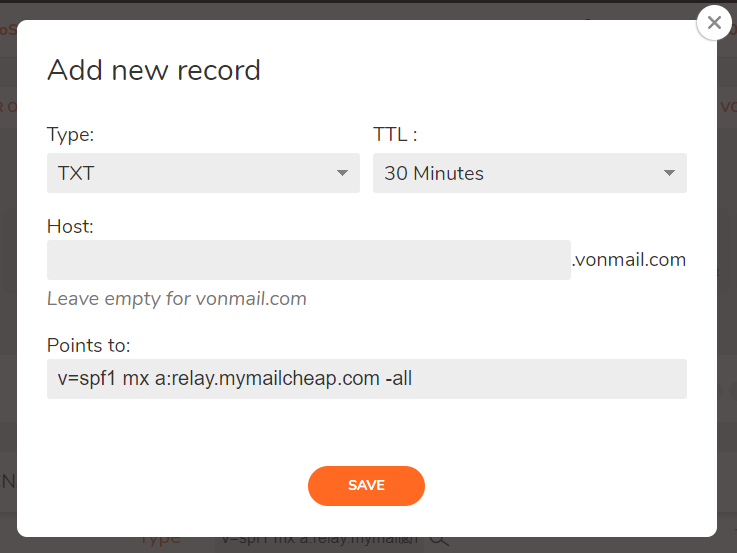
In this example, we will configure SPF record for the domain `vonmail.com`.
**Step 1**
Add a DNS `TXT` record pointing to `v=spf1 mx a:relay.mymailcheap.com -all`
**Overview**
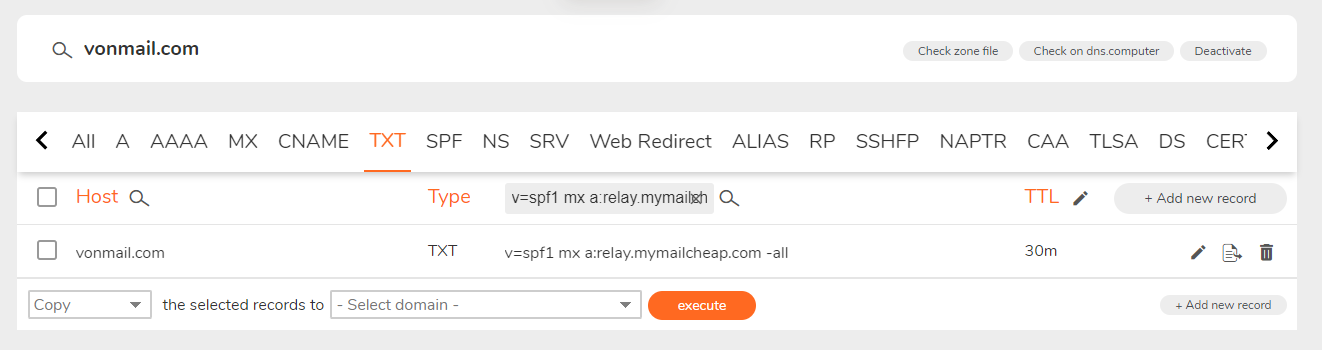
Here’s an overview of the configured SPF record:
**Caution**
SPF is configured as a `TXT` record in your DNS manager. SPF *should not* be configured using the deprecated `SPF` record type. A domain should have only 1 SPF record; remove your old host’s SPF record (if any).
***
### DKIM
#### What is a DKIM record?
A DKIM record is actually a specific type of TXT record to verify that a message’s content is trustworthy, meaning that they weren’t changed or tampered from the moment the message left the initial mail server.
#### How do I setup a DKIM record?
Setting up a DKIM record at your DNS provider (usually the same as your domain registrar) is a very simple process that can be done in under a minute.
#### Example setup
In this example, we will configure DKIM record for the domain `vonmail.com`.
**Step 1**
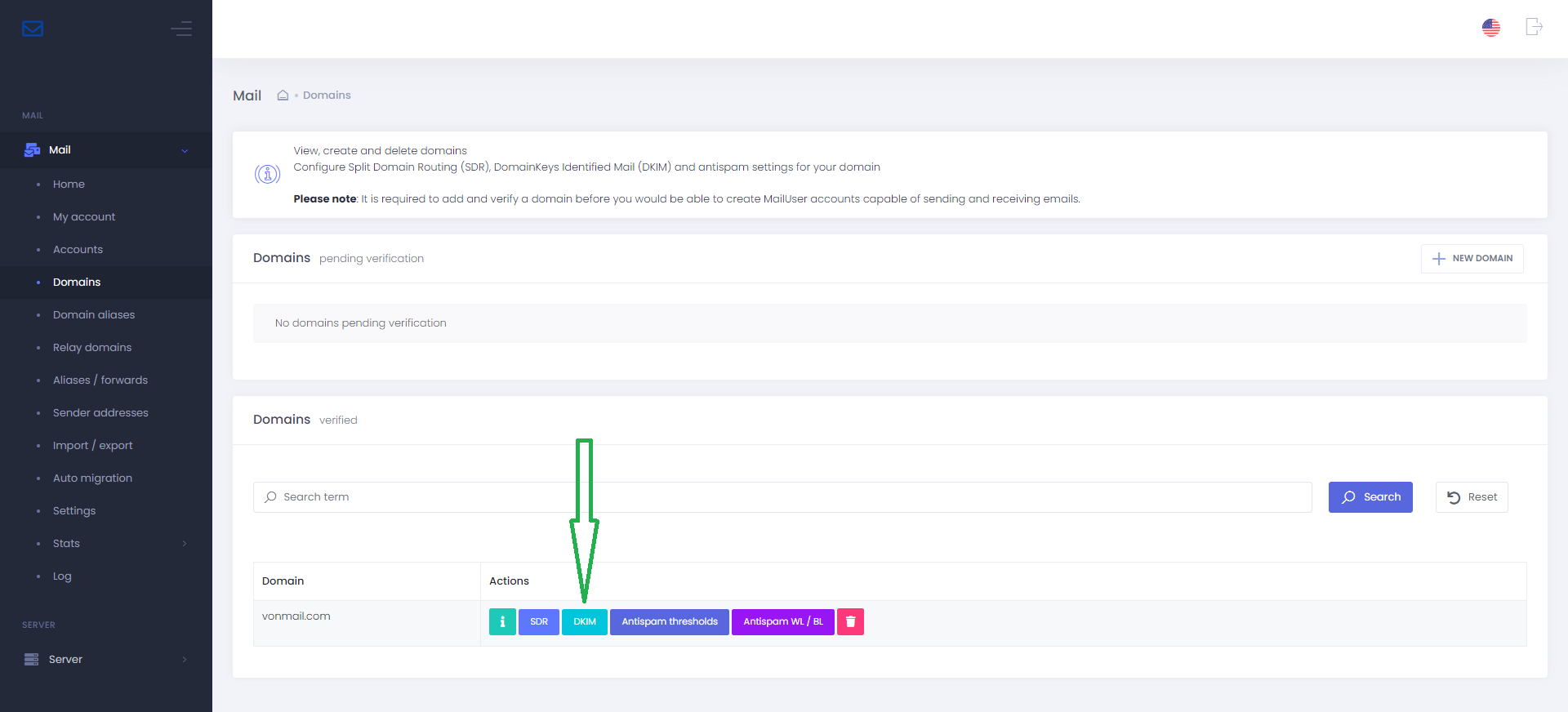
DKIM keys are unique to each domain and must be generated from [Mail Portal](https://meghna.exonhost.com). Once logged in to *Mail Portal*, from the menu bar > select *Domains* > from the list of Actions > *DKIM* > *Enable*. Please wait up to 1 minute for the DKIM key to be generated.
**Step 2**
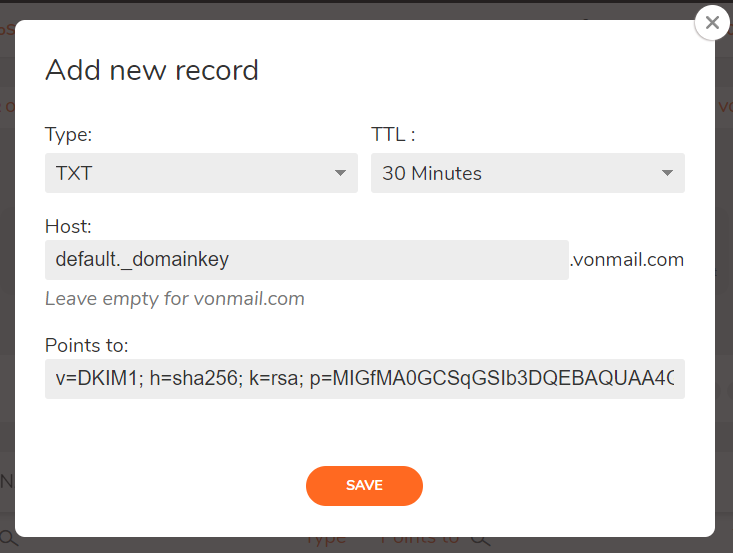
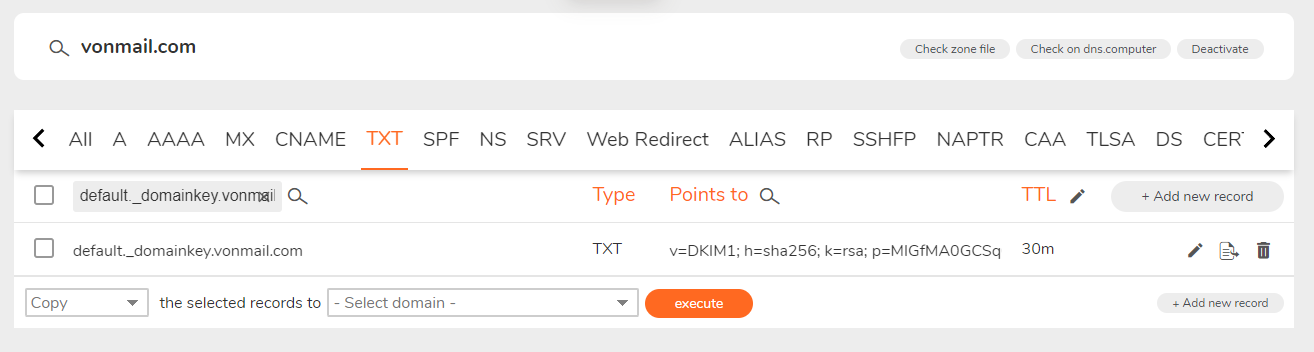
Add DKIM record in your DNS manager. Take particular note of the host value `default._domainkey`. That is, to create a DKIM record for the domain `vonmail.com`, the TXT record hostname must be `default._domainkey.vonmail.com`. The record must point to the DKIM key generated above.
**Overview**
Here’s an overview of the configured DKIM record:
***
### DMARC
#### What is a DMARC record?
A DMARC record is actually a specific type of TXT record used for email authentication that specifies a clear policy to enforce when SPF and DKIM fails. This record is paramount for preventing spoofing of your domain.
#### How do I setup a DMARC record?
Setting up a DMARC record at your DNS provider (usually the same as your domain registrar) is a very simple process that can be done in under a minute.
#### Example setup
In this example, we will configure DMARC record for the domain `vonmail.com`.
**Step 1**
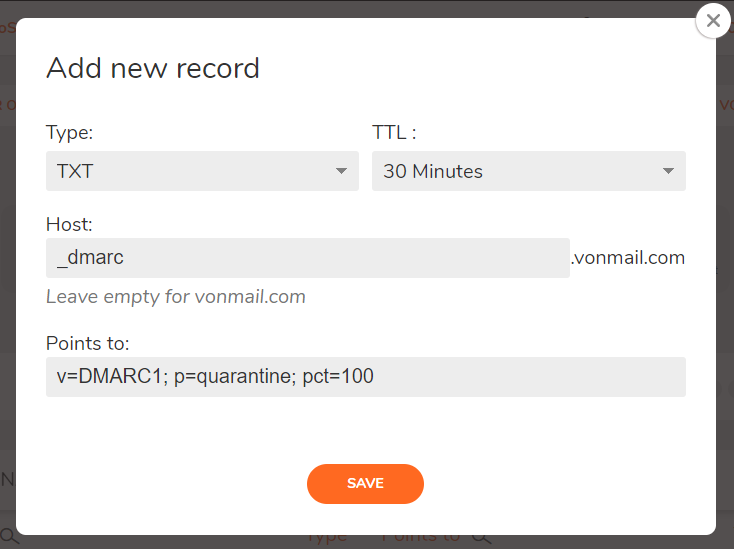
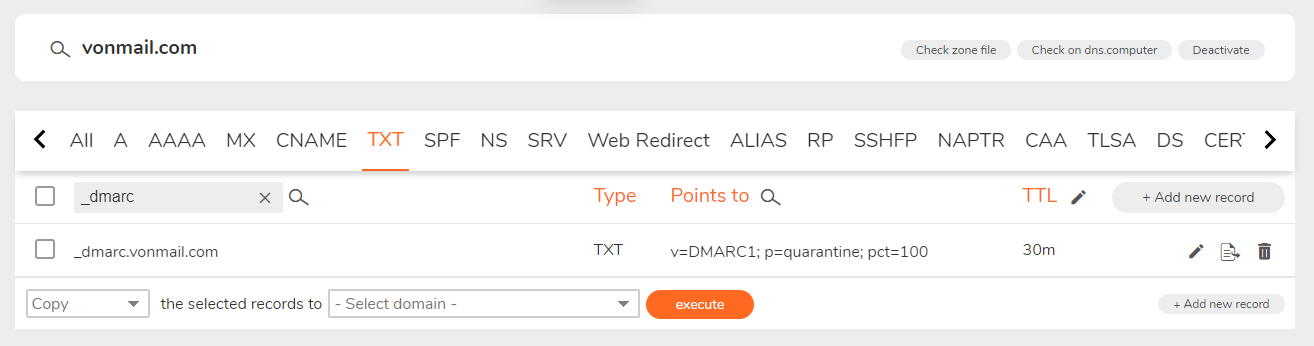
Add DMARC record in your DNS manager. Take particular note of the host value `_dmarc`. That is, to create a DMARC record for the domain `vonmail.com`, the TXT record hostname must be `_dmarc.vonmail.com`. The record should point to `v=DMARC1; p=quarantine; pct=100`.
**Overview**
Here’s an overview of the configured DMARC record:
Note
Both SPF and DKIM must be configured before setting up DMARC.
***
## Verify DNS
Verify and test your DNS settings by sending an email to `check-auth@verifier.port25.com` to get back a diagnostics report